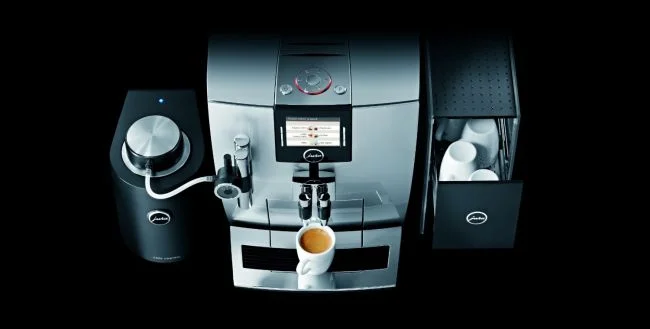
The Jura Impressa J9 uses a rotary dial and text display rather than the color touchscreen found on newer models. The menus are structured differently from the E8, S8, or Z10 - this guide covers J9-specific navigation for every setting you will actually need.
Navigating the J9 Menu
All J9 settings are accessed via the rotary dial on the right side of the machine:
- Turn the dial to scroll through options
- Press the dial once to select an option or confirm
- Press and hold (3 seconds) to enter the programming menu from the main screen
- Press the rotary dial + cancel button together to exit without saving
The J9 display shows text in a small LCD window. Backlit for visibility but not color. If the display is blank, the machine may be in standby - press any button to wake it.
Grind Size Settings
The J9 grinder has 9 settings (1 = finest, 9 = coarsest). The grind burrs are adjusted via the software menu, not a physical dial on the bean hopper like older Jura models.
To change grind size:
- Press and hold the rotary dial (3 seconds)
- Navigate to Grinder > Grind Setting
- Turn to select 1-9
- Press to confirm
Starting point by bean type:
| Bean Type | Starting Grind | Notes |
|---|---|---|
| Dark roast | 4-5 | Dark beans are softer, grind finer by default |
| Medium roast | 3-4 | Most common range for home use |
| Light roast | 2-3 | Hard, dense beans need finer setting |
| Pre-ground slot | N/A | Use the bypass doser, no grind adjustment |
How to dial in: If espresso is thin and weak, move 1 step finer. If the grinder runs very slowly or coffee comes out clumped, move 1 step coarser. Always run 2-3 cups after changing grind to flush the old grind through.
Coffee Strength
To change strength:
- Press and hold the rotary dial
- Navigate to Coffee > Strength
- Select 1-5 (3 is default/medium)
- Press to confirm
Strength controls how many grams of coffee the J9 grinds per cup. It is not a dose override for the grinder - the machine adjusts how long it grinds. At setting 5 (extra strong), the J9 grinds approximately 30-40% more coffee per cup than at setting 1.
If coffee still tastes weak at strength 5: Move grind finer by 1 step. Strength and grind work together - grind is typically more impactful than strength for improving extraction.
Coffee Volume (Cup Size)
To change volume:
- With the machine idle, start brewing a cup
- When the cup reaches your desired volume, press the rotary dial once to save that volume as the new default
- The J9 will use this volume for future brews on that button
The J9 has separate volume memories for espresso, coffee, and lungo - they are stored independently per button.
Default volumes (approximate):
- Espresso: 40ml
- Coffee: 100ml
- Lungo: 150ml
- 2x espresso: 80ml
Temperature
To change brew temperature:
- Press and hold the rotary dial
- Navigate to Temperature
- Select Low, Medium (default), or High
- Press to confirm
Medium is correct for most beans and cup types. Use High if drinks taste tepid. Use Low if the machine has steamed through a plastic smell - sometimes new machines benefit from 1-2 weeks at Low while the brew unit breaks in.
Milk Foam Settings (J9 One Touch)
The J9 One Touch has automatic milk frothing via the Jura Aroma+ milk system. The milk tube connects directly from the milk container to the machine.
To adjust foam density:
- Press and hold the rotary dial
- Navigate to Milk > Foam Density
- Select from Low, Medium, or High
- Press to confirm
Recommended by drink:
- Cappuccino: High foam density
- Latte macchiato: Medium foam density (milk layers need separation)
- Flat white: Low foam density (microfoam, not thick foam)
To adjust milk temperature:
- Navigate to Milk > Milk Temperature
- Select Low (55-60°C), Medium (65°C, default), or High (70°C)
Use Medium for most milk drinks. High above 70°C breaks down milk proteins and produces less stable foam - avoid unless you specifically prefer very hot milk drinks.
Water Hardness
To set water hardness:
- Press and hold the rotary dial
- Navigate to Maintenance > Water Hardness
- Select 1 (very soft) to 4 (very hard)
- Press to confirm
Test your water first: Dip the included Jura test strip into a glass of cold tap water for 1 second, wait 1 minute, compare the color to the guide on the strip packaging.
| Hardness Level | dH Range | Descaling Frequency |
|---|---|---|
| 1 (very soft) | 0-7 dH | Every 4-6 months |
| 2 (soft) | 7-14 dH | Every 2-3 months |
| 3 (medium) | 14-21 dH | Every 6-8 weeks |
| 4 (hard) | 21+ dH | Every 4-6 weeks |
Setting the wrong level causes the J9 to prompt for descaling either too early (level set too high) or too late (level set too low, causing scale buildup that shortens the machine’s life).
For Your J9
Jura Descaling Tablets
Always use Jura-brand descaling tablets in the J9. Third-party tablets can leave residue that affects coffee taste and may void warranty coverage on the brew unit.
Cleaning Schedule for the J9
The J9 runs automatic cleaning and rinsing programs at startup, shutdown, and after milk drinks. The machine prompts when each maintenance task is due.
| Task | Frequency | Product Needed |
|---|---|---|
| Milk system rinse | After every milk drink (auto) | Water only |
| Cleaning program | Every 180 brews | Jura cleaning tablet |
| Descaling | Per water hardness setting | Jura descaling tablet |
| CLARIS filter change | Every 50L / per prompt | Jura CLARIS filter |
| Brew unit cleaning | Monthly | Rinse under tap |
Never skip a prompted cleaning cycle. The J9 tracks these by brew count, not time. If you dismiss a cleaning prompt repeatedly, the machine may lock brewing until the cycle is completed.
J9 Cleaning
Jura Cleaning Tablets
Required for the J9’s automated cleaning cycle. Use the 6-pack - one tab per cycle, approximately every 3-4 months depending on usage.
Check Price →Water Filter
Jura CLARIS Filter
Reduces scale buildup and improves flavor. The J9 prompts when replacement is due. Replace every 50 liters or per the machine’s display.
Check Price →Factory Reset
To reset all J9 settings to factory defaults:
- Press and hold the rotary dial (3 seconds)
- Navigate to Maintenance > Factory Settings
- Confirm with the rotary dial
Warning: A factory reset clears all saved volumes, strengths, and temperature preferences. You will need to re-program each drink. It does NOT reset the brew count or maintenance history.
Thinking of Upgrading?
The J9 is a capable machine but its interface is significantly older than current Jura models. If you are finding the rotary dial navigation frustrating, or if your J9 is requiring frequent repairs, the E8 offers the same coffee quality with a modern color touchscreen, 17 specialties (vs the J9’s 10), and better milk foam technology.
J9 Upgrade
The Jura E8 - Modern Replacement for the J9
Same coffee quality, new color touchscreen, 17 one-touch specialties, HP3 fine-foam milk system. Current production model with full 2-year warranty.
Check E8 Price on Amazon →See also: Jura Impressa J9 Review | Jura Grinder Settings Guide | Master Troubleshooting Guide | How to Descale Your Jura